A growing organization can have dependable internet, modern cloud applications, and capable employees, yet still lose hours to a locked account, a failing laptop, or a security alert nobody has time to investigate. In a multi-site business, one delayed response can interrupt a branch, frustrate customers, and pull an operations leader away from higher-value work. Meanwhile, the internal team may be balancing daily tickets against patching, backups, compliance, and long-term technology planning.
That tension explains why outsourced IT support services have become an operating choice rather than a last resort. The global IT outsourcing market is projected to reach USD 752.08 billion by 2031, rising from USD 618.13 billion in 2025, according to Softura's 2026 IT outsourcing market overview. The practical question for a business leader isn't whether outsourcing exists. It's which responsibilities should remain internal, which should move to a partner, and how the arrangement should be measured.
Why Growing Organizations Consider Outsourced IT Support Now
A regional organization with several offices often reaches a predictable breaking point. Employees report slow applications and intermittent connectivity, but nobody has enough uninterrupted time to investigate the underlying network problem. A finance manager is worried about phishing. A school administrator needs reliable access to student systems. A field team needs phones and video meetings to work from different locations. The business keeps expanding, but IT coverage remains dependent on a small number of people.
The problem usually isn't a lack of effort. Internal staff may be working hard while spending most of the day reacting to interruptions. Routine maintenance gets postponed, documentation becomes incomplete, and security monitoring competes with urgent password resets. Costs also become difficult to forecast because emergency repairs, new equipment, and specialist projects appear outside the normal staffing plan.
Outsourcing has become a mainstream operating model
Large organizations have already normalized external IT partnerships. One industry source reports that 92% of Global 2000 companies outsource at least some IT services, reflecting a shift from basic labor arbitrage toward managed operations, cybersecurity, infrastructure support, and strategic oversight (ReformIT's outsourcing statistics).
That history matters to smaller organizations because it shows that outsourcing isn't limited to companies trying to reduce headcount. A provider can supply coverage, specialized skills, monitoring, and planning that a small internal team may struggle to maintain alone. An organization can also choose a limited arrangement rather than handing over every technology responsibility.
The right starting point is an honest gap review
Before contacting providers, leadership should document where the current model creates friction:
- Response gaps: Which issues wait too long, and which incidents lack a defined escalation path?
- Coverage gaps: Who handles urgent problems during leave, evenings, or site closures?
- Security gaps: Who reviews alerts, controls vendor access, and confirms that protective measures remain active?
- Planning gaps: Who connects technology decisions to expansion, compliance, staffing, or facility changes?
- Visibility gaps: Can leadership see recurring issues, unresolved risks, and support performance in one report?
A short inventory of these gaps gives the buying process a purpose. It also helps distinguish a provider that offers meaningful operational support from one that supplies a ticket queue.
What Outsourced IT Support Services Really Mean
Outsourced IT support is easier to understand through an everyday comparison. Hiring one specialist for a single problem resembles calling an electrician only after a circuit fails. A managed provider operates more like a staffed facilities crew. The crew responds when something breaks, but it also inspects equipment, tracks maintenance, watches for warning signs, documents work, and plans repairs before a small fault disrupts the building.
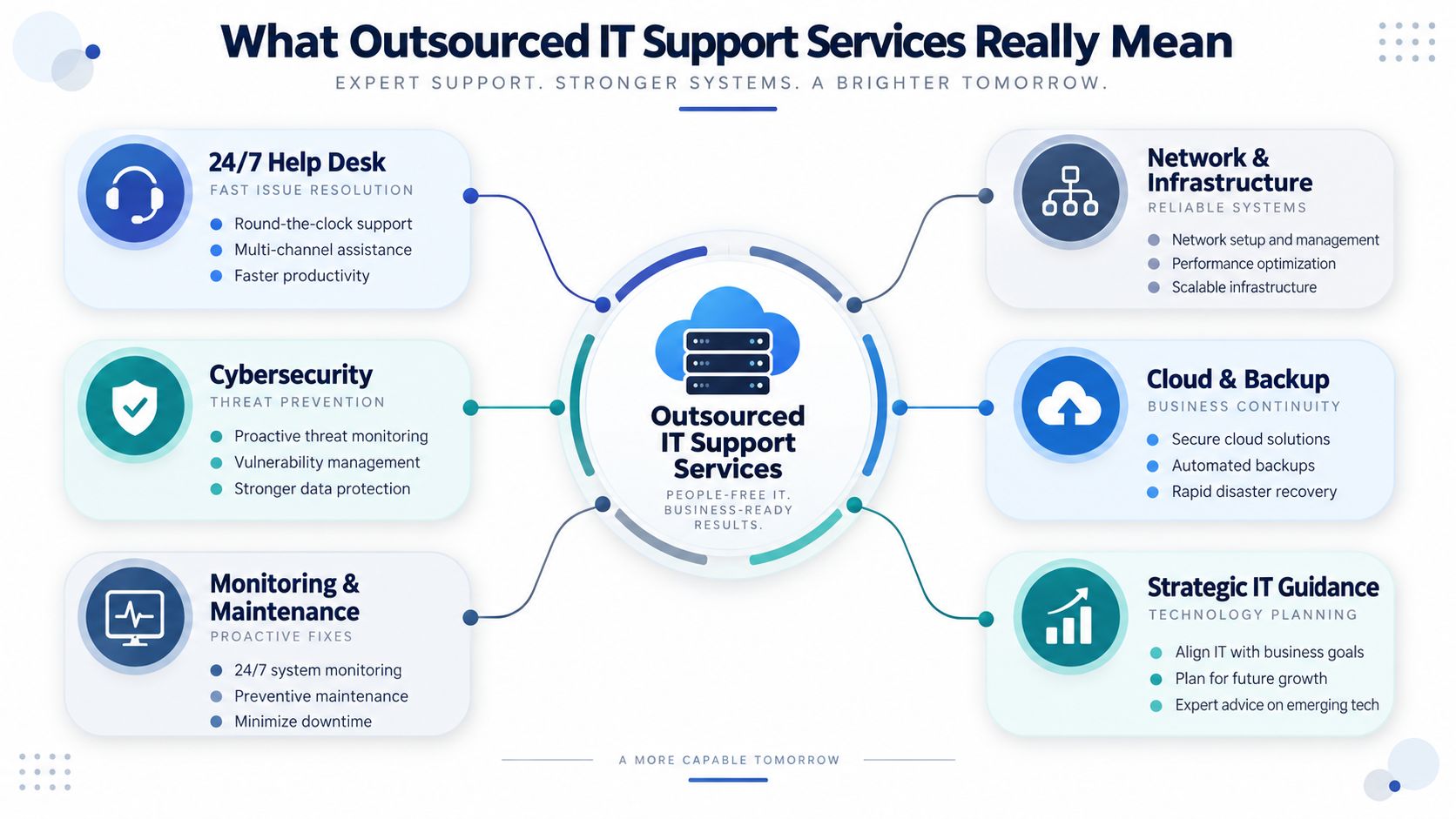
In practical terms, a provider may handle employee help desk requests, remote troubleshooting, device and server monitoring, patching, network administration, backup oversight, cybersecurity controls, vendor coordination, and technology planning. The exact scope depends on the agreement. A project consultant might configure a new phone system and leave. An outsourced support partner usually remains responsible for an agreed portion of ongoing operations.
The service has several layers
A useful way to evaluate scope is to separate the work into layers:
- User assistance covers password problems, application access, device issues, and everyday questions.
- Preventive operations includes monitoring, maintenance, patching, backup checks, and capacity review.
- Protection and recovery addresses endpoint security, access controls, incident response, and business continuity.
- Planning and accountability connects technology changes to budgets, growth, risk, and measurable service commitments.
This structure prevents a common misunderstanding. Outsourcing isn't the same as buying unlimited assistance with no boundaries. A sound agreement states what the provider manages, what the client owns, which projects are separate, how emergencies are escalated, and how performance is reported.
Predictability matters as much as technical skill
A recurring service model can make technology spending easier to plan, especially when internal staffing costs fluctuate with hiring, turnover, training, and urgent work. It can also reduce operational risk by assigning responsibility for tasks that otherwise remain informal, such as alert review, access removal, and backup verification.
Cloud-based operations add another dimension. Organizations evaluating how hosted infrastructure changes support responsibilities may benefit from this overview of the future of cloud managed IT. The central idea is simple:
Outsourced IT support is an accountability model for keeping technology available, protected, maintained, and aligned with business needs.
Comparing Break Fix Managed Co Managed and Fully Outsourced Models
The four common models sit on a spectrum. Break/fix support waits for a problem. Managed support pays for ongoing prevention and oversight. Co-managed IT combines an internal team with external capacity. Fully outsourced IT transfers day-to-day responsibility for an agreed environment to an external team.
| Service Model | How It Works | Best For | Trade Off to Consider |
|---|---|---|---|
| Break/fix | A provider is called when an issue appears, usually for a specific repair or project. | Organizations with simple environments, strong internal ownership, and low demand for continuous monitoring. | Costs and response times can be unpredictable, and recurring faults may remain unresolved. |
| Managed services | A provider monitors, maintains, supports, and reports on defined systems through a recurring agreement. | SMBs that need dependable coverage, security attention, and predictable operations. | The client must define scope clearly and accept standardized processes. |
| Co-managed IT | An external provider supplements internal staff with help desk coverage, specialist expertise, monitoring, projects, or after-hours support. | Organizations with an effective IT employee or team that lacks capacity in selected areas. | Responsibilities can become unclear unless ownership, escalation, and documentation are explicit. |
| Fully outsourced IT | The provider manages most daily IT operations, support workflows, security activity, and planning under agreed governance. | Organizations without sufficient internal coverage or those seeking a complete operating layer. | The client gives up some direct control and must select a partner with strong communication and accountability. |
A practical decision matrix
A small organization with no dedicated IT employee may need managed or fully outsourced support because basic continuity depends on external coverage. A larger organization with a trusted systems administrator may prefer co-managed support for cybersecurity monitoring, complex network work, or overflow tickets.
Organizations with strict compliance obligations, multiple locations, or limited tolerance for downtime generally need more than reactive assistance. Conversely, a stable office with a technically capable internal owner may use break/fix help for occasional projects, provided leadership understands the exposure created by limited monitoring.
The distinction between co-managed and fully outsourced support deserves particular attention. Co-managed arrangements preserve internal knowledge and local decision-making while adding depth. A provider may take responsibility for endpoint security and escalation while the internal team manages employee relationships and business applications. A fully outsourced arrangement makes sense when the organization wants one accountable partner for the daily service desk, infrastructure, security coordination, and technology roadmap. This co-managed IT support resource provides useful context for organizations weighing that middle path.
Decision rule: Keep work internal when it depends on deep organizational context. Outsource work when it requires continuous coverage, specialized expertise, or disciplined monitoring that internal capacity can't reliably sustain.
Core Offerings That Keep Systems Secure and Connected
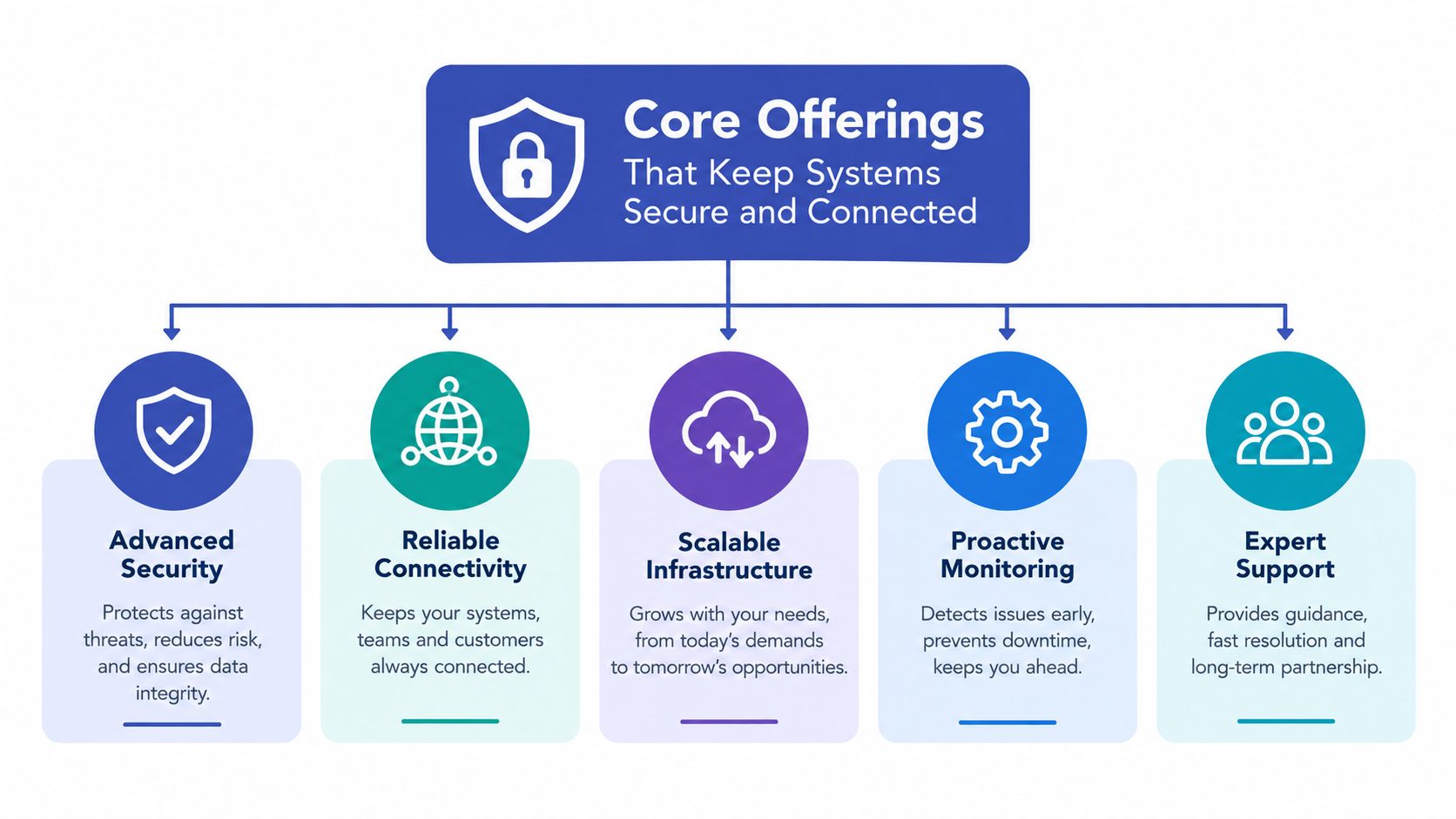
A modern support partner shouldn't treat networking, cybersecurity, backups, communications, and physical security as unrelated purchases. Each layer affects the others. A weak wireless network can disrupt voice and video calls. Poor access controls can expose shared files. An untested backup can turn a recoverable incident into a prolonged outage.
Infrastructure and network management
The foundation includes switches, wireless access points, firewalls, servers, cloud connections, user devices, and the monitoring systems that reveal when performance changes. A provider can maintain configurations, identify capacity problems, coordinate internet vendors, and document the environment. For a multi-site organization, centralized visibility helps staff compare locations instead of troubleshooting each office in isolation.
Cybersecurity and access control
Security support should cover more than installing antivirus software. Effective operations may include endpoint protection, alert review, email security, vulnerability management, MFA enforcement, credential vaulting, and incident escalation. Vendor access needs special care because an external connection can become a route into internal systems if permissions are excessive or sessions aren't monitored.
Independent guidance on outsourced cyber risk recommends explicit contract boundaries, business-continuity controls, breach-response procedures, continuous vendor monitoring, and credential rotation when an engagement ends (Texas Society of CPAs guidance on outsourcing technology risk). Least privilege means each technician receives only the access required for the assigned task.
Backups and business continuity
Backups protect data only when they run successfully, remain separated from production systems, and support practical restoration. A provider should define what gets backed up, how failures are escalated, who authorizes recovery, and how business operations continue during an outage. The conversation should include applications, communications, shared files, and critical workflows, not just servers.
Unified communications and video security
Business communications can connect desk phones, mobile devices, instant messaging, email, and audio, video, and web conferencing. A user moving between an office and a remote location should have a consistent way to communicate without creating a separate support problem for every device.
Video security adds another operational layer. Scalable cameras, secure remote access, and centralized visibility can help organizations monitor facilities across locations without forcing every site to operate as a disconnected system. The value comes from integration and dependable access, not from collecting more technology than staff can manage.
Business Benefits and Real World Use Cases by Industry
The strongest reason to outsource isn't the provider's tool list. It's the operational result. A well-designed arrangement can create a more predictable technology budget, improve security discipline, shorten the path from issue to resolution, and release internal employees from repetitive maintenance.
Research from ConnectWise reports that 59% of SMBs outsource IT infrastructure, 59% outsource IT services, and 57% outsource IT cybersecurity. The same research identifies better-performing IT services at 41%, increased security at 40%, and faster implementation of new technology at 38% among reported benefits (The State of SMB Cybersecurity in 2024).

Schools and educational nonprofits
A school or child services organization must balance limited administrative capacity with sensitive information, reliable access, and continuity during busy periods. Outsourced support can assign clear ownership for account access, device maintenance, network availability, backup review, and incident escalation. Staff members can focus on students and families instead of diagnosing a wireless problem between scheduled activities.
Manufacturing and engineering
Manufacturers depend on stable connectivity between offices, production areas, design tools, suppliers, and remote employees. An outsourced team can coordinate network improvements, secure remote access, endpoint protection, and vendor support while documenting changes carefully. The priority isn't faster troubleshooting. It's preserving reliable operations while reducing the chance that an unmanaged device or poorly controlled connection disrupts the environment.
Faith-based and community organizations
Faith-based organizations often operate with volunteers, part-time staff, multiple buildings, and varied technology experience. A support partner can modernize phone systems, standardize user assistance, strengthen access controls, and connect communications across locations. Clear training matters because successful adoption depends on people knowing how to use the new system.
Distributed and multi-site teams
A distributed organization needs more than remote help desk access. It needs consistent policies, centralized visibility, dependable communications, and a repeatable onboarding process for every location. Outsourced support can give leaders one view of recurring issues, security activity, devices, communications, and site connectivity, making expansion easier to manage.
A survey summarized by Sharp Business Systems found that 95% of SMBs were using, planning to use, or interested in using managed service providers for IT threats. Reported benefits included reduced operational risk, time savings, more staff time for other projects, better SLAs, lower complexity, and cost savings (Sharp's survey summary on outsourced IT security).
Pricing Models SLAs and What Good Service Levels Look Like
Pricing becomes easier to compare once buyers separate recurring operations from project work. A monthly agreement may cover users, devices, monitoring, help desk support, maintenance, security controls, or a defined combination of those services. A network redesign, office move, phone deployment, or major recovery effort may be scoped separately.
Some providers price per user, while others use per device, service bundles, or a hybrid structure. A recent benchmark survey reports that 21% of providers charge USD 50 to USD 100 per user per month, while 15% charge USD 101 to USD 150 per user per month (MSP pricing survey summary). Those figures are market reference points, not a quote for a particular environment. Location count, security requirements, cloud complexity, support hours, and project responsibilities all influence the final proposal.
Service levels need operational definitions
An SLA should say what happens after a ticket arrives, not merely promise excellent support. For a P1 critical incident, industry guidance commonly frames acknowledgement within 15 to 30 minutes, with technician contact or active engagement within about one hour (managed IT support SLA guidance). Lower-priority issues are commonly handled during business-hour timelines, but the agreement should define those timelines precisely.
A useful SLA includes:
- Priority definitions: The agreement should distinguish a widespread outage from one user's inconvenience.
- Acknowledgement targets: The provider should confirm receipt within a stated period.
- Escalation paths: Tier 1 staff need a clear route to Tier 2 specialists and incident leadership.
- Communication duties: The client should know who receives updates and how often.
- Resolution language: Targets should distinguish restoration, workaround, and permanent correction.
- Reporting rules: Monthly reports should show trends, exceptions, and unresolved risks.
A 2026 global benchmark tracks outsourced support against internal service desks using an NPS-style user-experience measure and treats first-line service desk sourcing as a distinct performance category (HappySignals Global IT Benchmark 2026). Buyers should request first-contact resolution, response-time adherence, and user-satisfaction results side by side with internal benchmarks before signing.
For a practical explanation of how service scope affects fees, review this guide to managed services pricing. The best proposal isn't automatically the cheapest. It's the one that makes coverage, exclusions, accountability, and reporting easy to understand.
How to Choose Onboard and Transition to the Right Provider
Provider selection should begin with evidence, not a polished sales presentation. Leadership should ask how the provider handles escalation, documents environments, protects administrative access, supports communications systems, manages video security, and reports service performance. References from organizations with similar locations, regulatory pressures, or operating hours can reveal whether the proposed model works outside the sales process.
A practical evaluation checklist
- Scope clarity: The proposal should identify included support, excluded projects, response windows, after-hours coverage, and client responsibilities.
- Technical depth: The provider should demonstrate capability across networks, endpoints, cloud services, cybersecurity, backups, phones, and collaboration tools.
- Communication quality: Leaders should know who owns the relationship, who receives incident updates, and how recurring problems reach decision-makers.
- Security discipline: Ask about MFA, least privilege, credential vaulting, session monitoring, access reviews, and offboarding.
- Onboarding method: A serious provider should explain asset discovery, documentation, risk remediation, knowledge transfer, and phased cutover.
- Training and adoption: New phone systems or collaboration tools need user training, not just installation.
Organizations comparing vendors can use this guide on how to choose a managed service provider to structure evaluation questions. If the provider also supports revenue operations, businesses may separately evaluate Outsourced Appointment Setters as a sales resource, but that function shouldn't be confused with IT service ownership.
Transition without losing control
The first stage should inventory users, devices, applications, locations, vendors, contracts, backups, and known risks. Next, the incoming team should place administrative credentials in a secure vault, enforce MFA, apply least-privilege access, and record the systems each role can reach. Knowledge transfer should include recurring issues, business-critical workflows, contact lists, maintenance windows, and escalation preferences.
A phased cutover is safer than an abrupt handoff. The provider can begin with discovery and monitoring, resolve urgent risks, validate ticket routing, and then assume broader responsibilities after both sides confirm the operating process. Co-managed and fully outsourced choices should be revisited as staffing, locations, and risk change. AI readiness deserves the same scrutiny. OpenText reported that 92% of managed service providers saw AI-driven growth, while readiness gaps were widening, so buyers should ask how AI-assisted support is governed, monitored, secured, and reviewed rather than accepting an AI label at face value (OpenText's 2025 MSP AI findings).
Nutmeg Technologies provides flexible managed IT services, co-managed support, cybersecurity, communications systems, proactive monitoring, and technology planning for growing organizations. Visit Nutmeg Technologies to discuss current support gaps, compare engagement models, and plan an onboarding path that fits the organization's growth.