A school administrator approves a vendor's remote session from a home laptop. A field engineer checks a manufacturing system from a hotel. An employee signs in from a personal device because the office network is unavailable. Each connection solves a real business need, but each one also creates another entrance into the organization.
That's why remote access security deserves attention from business leaders, not only IT teams. Remote connections can expose identities, devices, applications, production systems, and sensitive records beyond the traditional office perimeter. The right question isn't whether employees use a VPN or MFA. It's whether the organization knows who connected, from which device, to what system, with what privileges, and what happened during the session.
Introduction to Remote Access Security for Modern Teams
A growing business may have employees working from home, contractors supporting a project, vendors maintaining equipment, and managers moving between multiple sites. The same organization might rely on remote desktop tools for accounting, cloud applications for collaboration, and secure connections to cameras, servers, or operational technology.
Convenience makes these workflows productive. It also means the “front door” no longer sits at the main office. It may be a VPN appliance, a cloud identity provider, an RDP gateway, a remote support application, or a vendor account that nobody remembers creating.
The financial consequences can be substantial. An IBM Cost of a Data Breach analysis from 2021 found that breaches involving remote work as a contributing factor averaged $4.96 million, compared with $3.89 million for breaches without that factor. The difference was $1.07 million, which shows why remote access security is a direct business risk involving recovery, legal exposure, downtime, and operational disruption, not merely an IT configuration task. The remote access security analysis summarizing IBM's findings provides the underlying figures and context.
Why the office perimeter no longer defines risk
A password can be stolen outside the office. A laptop can be infected at home. A contractor can receive broader access than the task requires. A remote session can remain active after the original business need ends.
The practical objective is to make every connection deliberate and observable. A sound program combines identity verification, device checks, encrypted traffic, least-privilege permissions, session oversight, and a way to shut access down quickly.
A useful first action is a remote access inventory. Business leaders should ask which systems accept remote connections, who owns each connection, which vendors use it, whether sessions are recorded, and how access is disabled during an incident. Organizations that can't answer those questions have a visibility problem before they have a technology problem.
What Remote Access Security Means and How It Works
Remote access means connecting to an organization's systems from outside its trusted office network. That could involve an employee opening a cloud application, an administrator connecting to a server, a technician viewing a production workstation, or a vendor accessing a specialized system.
The simplest analogy is a building. Remote access security acts like the combination of the front door, identification desk, security cameras, visitor rules, and staff-only rooms. A VPN can create a protected route to the building, but it doesn't automatically decide which rooms a visitor may enter or record everything the visitor does.
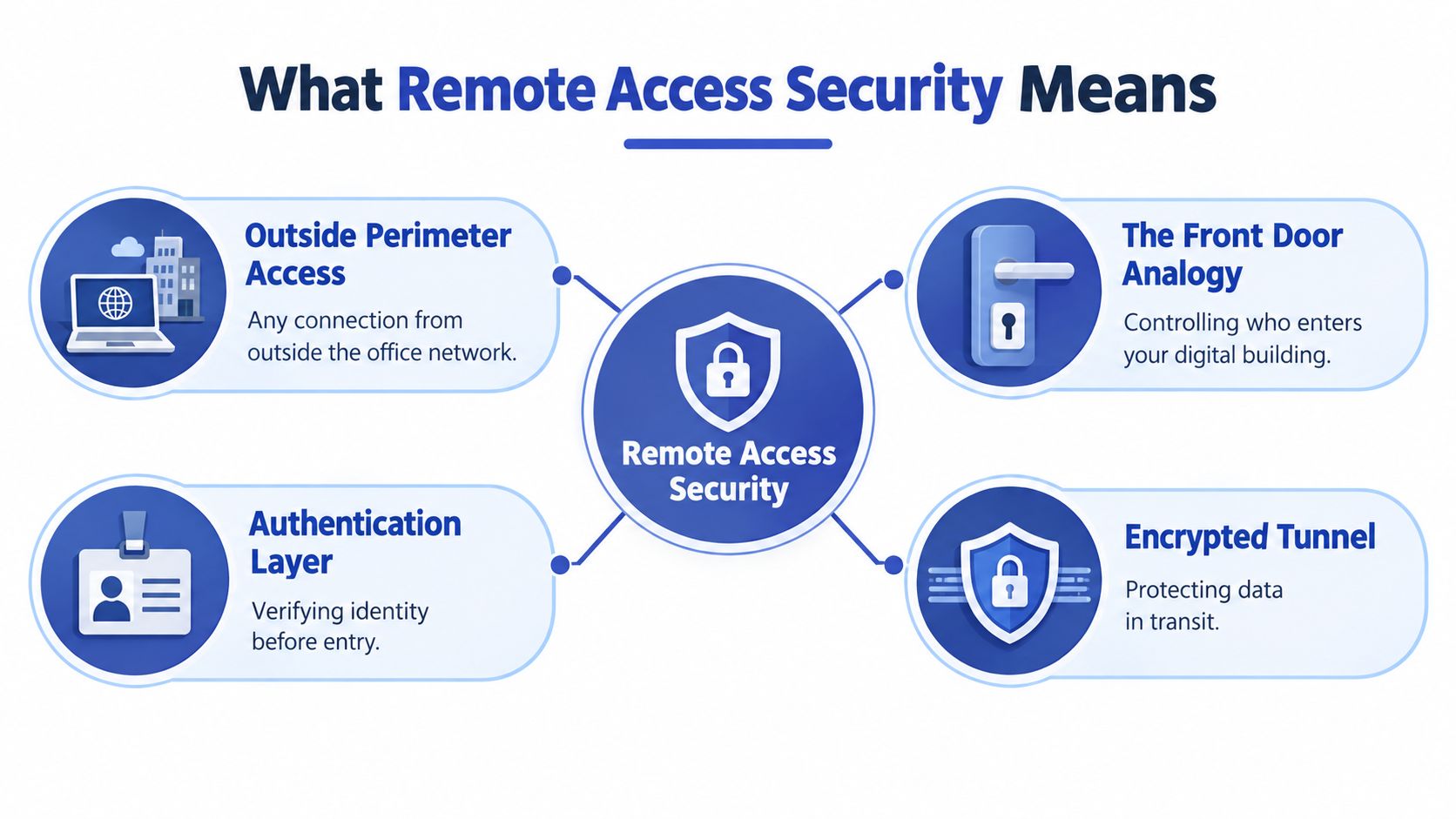
The four security questions behind every connection
A reliable design answers four questions in order:
- Who is requesting access? Identity controls verify the person or service account. MFA adds another proof beyond a password.
- Is the device trustworthy enough? The organization checks whether the laptop or phone is managed, patched, encrypted, and protected.
- Can outsiders read or alter the traffic? Cryptography preserves confidentiality and integrity while information travels across an untrusted network.
- What should this identity reach? Policy limits access to the applications, servers, data, or equipment required for the approved task.
NIST recommends protecting remote access traffic with cryptography and authenticating both endpoints, so each side verifies the other's identity. It also advises organizations to assume telework devices may become infected and to use antimalware protection plus network access control that checks device posture before access is granted. NIST SP 800-46 Rev. 2 describes these mechanics in detail.
A laptop connecting from home through a VPN illustrates the sequence. The connection is encrypted, the user proves identity with MFA, the gateway checks the laptop's security status, and policy determines whether that user can reach a file server, an application, or nothing beyond a specific service. If the device fails the health check, access should be blocked or restricted.
Why zero trust changes the model
Traditional perimeter security often assumes that a user becomes trustworthy after entering the network. Zero trust removes that assumption.
Zero trust means no user or asset receives implicit trust. Each request must be continually reauthenticated and reauthorized.
NIST defines zero trust architecture as a model for secure, authorized access to distributed enterprise resources across on-premises and cloud environments, including hybrid work and partner access from any location or device. NIST's zero trust architecture guidance frames access as an ongoing decision rather than a one-time doorway check.
That distinction matters after login. A user may be authenticated, but the session can still be limited by application, device condition, time, role, location, and behavior.
Common Threats and Risk Scenarios You Should Know
A technician signs in from a coffee shop, a contractor connects to a site, or an employee opens a shared application from home. The login may be legitimate, yet the session can still expose more than the person needs. Remote services sit at the organization's edge, accept incoming connections, and often lead toward valuable systems.
According to 2025 to 2026 claims data summarized in The 2026 remote work security analysis, remote access services were the entry point for 87% of ransomware claims. Where an entry vector was identified, VPN compromises accounted for 73% of ransomware intrusions, compared with 38% in 2023 and 66% in 2024. The analysis also explains why phishing-resistant MFA, including FIDO2 or passkeys, helps address adversary-in-the-middle attacks that steal active session tokens instead of guessing passwords.
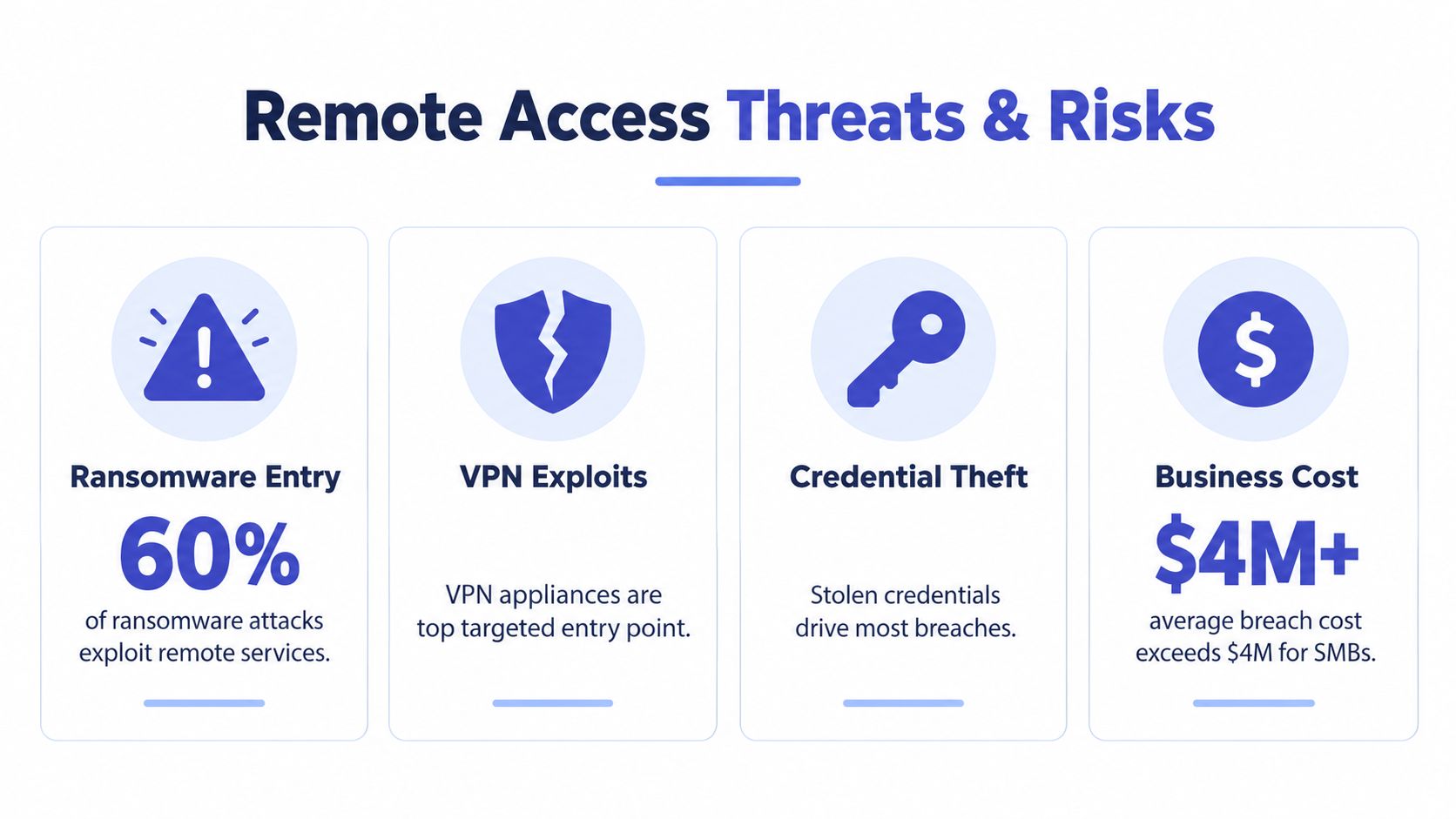
The attack paths leaders should recognize
Ransomware through remote services can start with a stolen credential, an unpatched VPN appliance, or an exposed remote desktop service. After entry, an attacker may search for file shares, administrative accounts, backups, and systems that can spread the disruption. Limiting permissions and controlling the session can reduce that path.
Credential theft isn't limited to passwords. In an adversary-in-the-middle attack, a fake sign-in flow can trick a user into surrendering a session token. The attacker then uses a valid-looking session, which can bypass MFA that is not resistant to phishing. Continuous checks and session termination help address what happens after login.
Exposed RDP creates a direct target. RDP should never be exposed directly to the public internet. Public instances are repeatedly scanned and brute-forced, so access should pass through a controlled gateway with strong authentication, timely patching, narrow permissions, and monitoring.
Vendor access can outlive the project. A contractor may retain an account after equipment maintenance ends, or several technicians may share one login. Individual identities, time-limited approval, and activity records let an organization determine who performed an action and close access when the work is complete.
Why the cost reaches beyond IT
The breach-cost gap covered in the introduction reflects how difficult incidents become to contain when users, devices, and data operate outside the traditional office. The larger concern is operational reach, not only the initial compromised account.
For a school, the risk may involve administrative records and shared systems. For a manufacturer, a vendor session may reach engineering workstations or production environments. For a multi-site office, one reused credential may provide a route across locations.
Organizations that manage cameras and physical security should review access to surveillance systems, recording platforms, and management consoles. A practical starting point is this guide to remote access security for cameras, particularly where multiple sites or third-party support are involved.
Essential Controls That Strengthen Remote Access
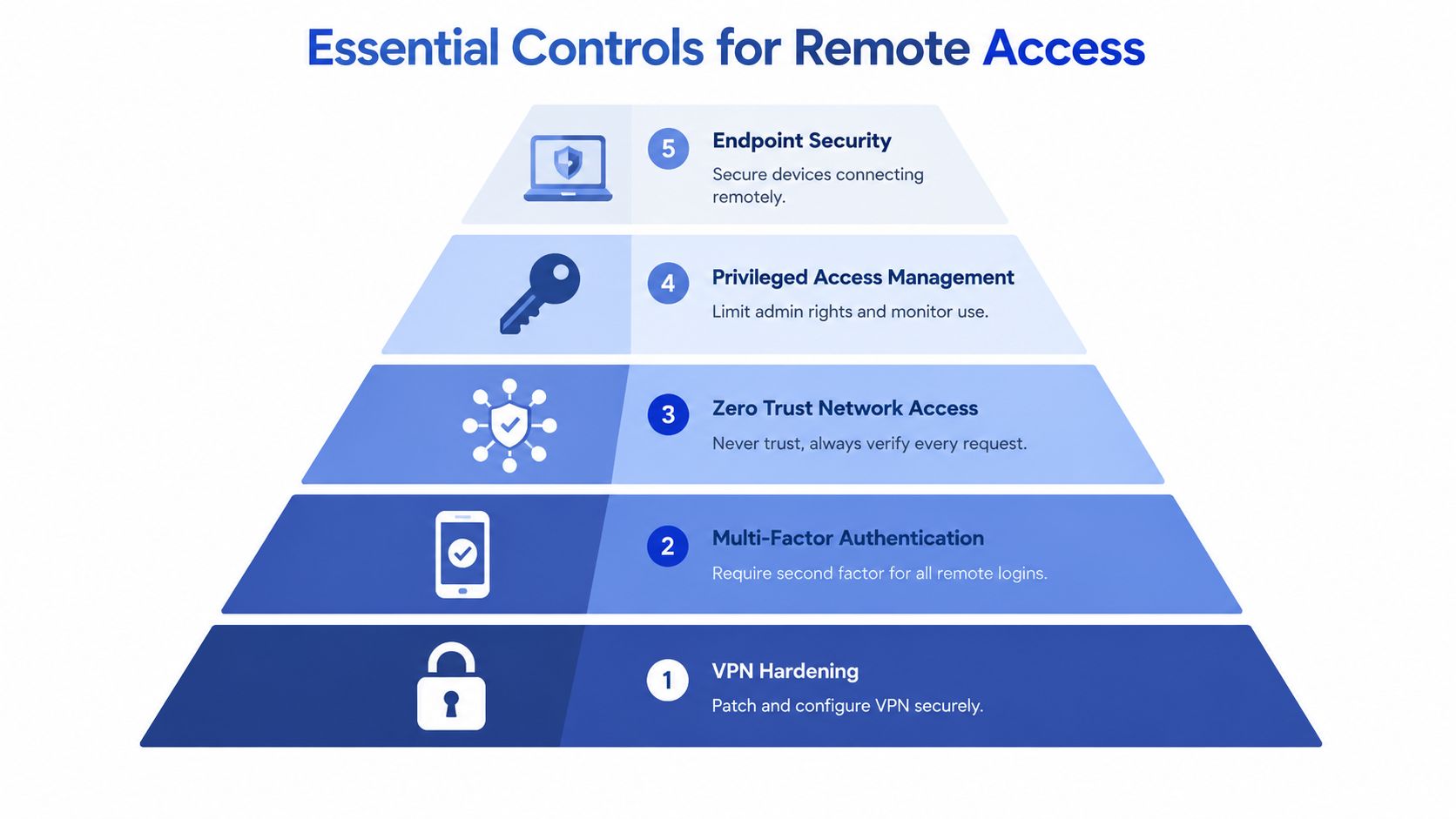
MFA and VPNs remain useful, but they don't answer the most important post-login question: what can the person do after access is approved? Strong remote access security layers identity, endpoint, network, privilege, session, and monitoring controls.
How the main controls fit together
VPN hardening remains appropriate when a business must connect users to established network services. The gateway should be patched, centrally managed, placed at the network perimeter, and configured to expose only required resources. NIST recommends a single controlled entry point so policy enforcement, logging, and emergency shutdown are manageable. NIST's telework and remote access guidance supports that “front door” approach.
Zero Trust Network Access is often a better fit when users need specific applications rather than broad network access. It evaluates each request and avoids placing the user directly on the whole network. CISA and its partners urged organizations in June 2024 to move toward Zero Trust, Secure Service Edge, and Secure Access Service Edge approaches for stronger visibility and control. CISA's network access security guidance explains the broader shift.
Phishing-resistant MFA uses methods such as FIDO2 security keys or passkeys. These controls help prevent attackers from reusing credentials or capturing authentication sessions through deceptive sign-in pages.
Privileged access management separates everyday work from administrative work. An administrator should receive enhanced rights for a defined task, for a defined period, with activity logged and reviewed.
RDP hardening and secure remote support keep direct remote desktop exposure away from the public internet. Remote support tools should require explicit approval, use named accounts, restrict file transfer and clipboard functions when appropriate, and preserve an audit trail.
Logging and monitoring provide the evidence needed to detect unusual access. Useful signals include unfamiliar devices, impossible travel patterns, repeated failed logins, unusual administrative activity, and sessions that remain active after approval expires.
For a deeper explanation of application-focused access, organizations can review zero trust access control.
Choosing the right remote access control for your situation
| Control | Best For | Key Strength | Watch Out For |
|---|---|---|---|
| Hardened VPN | Legacy applications and broad network services | Familiar encrypted connectivity | Can grant more network reach than the task requires |
| ZTNA | Cloud applications, hybrid teams, and partner access | Application-level access and continuous policy checks | Requires clear application inventory and identity integration |
| Phishing-resistant MFA | Employees, administrators, and vendors | Reduces exposure to stolen passwords and deceptive sign-ins | Must be deployed consistently across remote paths |
| PAM | Administrators and high-impact systems | Limits and records elevated privileges | Shared accounts and emergency exceptions can undermine control |
| Session controls | Vendors, support teams, OT, and RDP workflows | Shows what happens after login | Requires storage, review processes, and appropriate privacy rules |
| Endpoint posture checks | Personal, remote, and field devices | Blocks unhealthy devices before access | Device inventory and management must remain current |
The controls work best as a system. ZTNA can reduce network exposure, MFA can validate identity, endpoint checks can evaluate the device, PAM can restrict privilege, and session monitoring can document the work.
Practical Implementation Roadmap for SMBs
A small IT team doesn't need to redesign every connection at once. A phased plan reduces exposure quickly, creates ownership, and gives leadership a way to fund improvements without turning security into an undefined project.
Phase one starts with visibility and quick wins
Create a complete list of VPN gateways, RDP systems, remote support tools, cloud administrators, vendor accounts, and device types. Each entry should have an owner, a business purpose, an approval method, and a documented shutdown process.
Then close obvious gaps. Remove unused accounts, disable direct public RDP exposure, patch remote access appliances, require MFA for every supported remote path, and replace shared credentials with named identities. A formal inventory matters because recent OT and industrial research found that 31% of organizations did not maintain a formal inventory of remote access points. SANS research on remote access controls in ICS and OT highlights the governance problem.
Phase two centralizes and hardens access
Use one managed gateway wherever the architecture allows it. NIST recommends routing remote access through authorized managed access control points, protecting session confidentiality and integrity, and retaining the ability to disconnect or disable remote access within an organization-defined period. NIST AC-17 requirements provide a useful control baseline.
A multi-site office might replace several informal vendor pathways with one hardened gateway and separate policies for each site. A school could route administrator access through one managed entry point instead of exposing multiple internal systems. Both examples make logging, emergency shutdown, and policy review simpler.
Phase three adds context and privilege limits
Introduce device posture checks so unmanaged or unhealthy laptops don't receive normal access. Move suitable applications from broad VPN access to ZTNA, and place administrative work behind PAM. Require approval for sensitive vendor sessions, especially when the session can reach production, financial, student, healthcare, or identity systems.
Phase four monitors and improves
Review access logs, privileged sessions, failed authentication, inactive accounts, and vendor activity on a defined schedule. Test the disconnect process so the organization knows who can terminate access, how quickly the action works, and what evidence remains afterward.
Nutmeg Technologies can assess VPN, cloud identity, RDP, endpoint, and compliance conditions, then help organizations stage improvements around available staff and budget. A focused assessment gives leadership a prioritized list instead of another collection of disconnected security tools.
Compliance Vendor Selection and Monitoring Essentials
A vendor's value becomes clearer after the login screen. Authentication confirms identity at one moment. It does not show whether the user reached the approved system, performed only the assigned work, or lost access when the task ended. For a multi-site or hybrid team, the vendor should function like a staffed reception desk: check the visitor, limit where they can go, record the visit, and provide a way to end it.
The AC-17 baseline covered earlier gives procurement teams a practical starting point. Remote access should use monitored and controlled methods, cryptographic protection, authorized access points, and a defined process for disconnecting or disabling access. Privileged remote commands and security-sensitive access should be limited to documented business needs.
Questions to ask before signing
- Identity: Does the platform support individual accounts, MFA, role-based access, and phishing-resistant authentication?
- Device context: Can it verify that the endpoint is managed, patched, encrypted, and protected?
- Session evidence: Does it record the user, destination asset, time, and actions taken?
- Session recording: Can the organization record and replay sensitive sessions where policy and law permit?
- Approval workflows: Can a manager approve access in real time, restrict its duration, and revoke it immediately?
- Protocol awareness: Can the system distinguish an ordinary application session from RDP, SSH, VNC, or an industrial control workflow?
- Emergency response: Is there a clear kill switch that authorized staff can use without waiting for the vendor?
- Integration: Can logs reach security monitoring, ticketing, identity, and compliance systems?
A checklist is only useful if contracts make the requirements enforceable. Specify account ownership, approval responsibilities, log retention, incident notification, support access, subcontractors, offboarding, and evidence supplied during reviews. Ask vendors to demonstrate how an account is created, changed, suspended, and removed. Request a sample audit trail rather than accepting a feature list.
Healthcare teams can consult this HIPAA compliant virtual assistants guide when reviewing sensitive workflows and access responsibilities. For broader oversight, IT vendor management best practices can help connect contract terms, access reviews, and accountability.
Nutmeg Technologies can help assess whether a vendor's VPN, cloud identity, endpoint, RDP, logging, and compliance capabilities match the organization's needs. Review the arrangement on a defined schedule, test emergency termination, confirm inactive accounts are removed, and compare delivered evidence with the agreed requirements.
Putting It All Together and Next Steps for Secure Access
Remote access security works when the organization controls the whole journey, from the first identity check to the final session review. A VPN or MFA prompt can open the door, but least privilege, device posture, approvals, recording, monitoring, and a rapid shutdown capability determine what happens inside.
A compact incident checklist helps teams act without debate:
- Detect: Identify the account, device, source, application, and active sessions involved.
- Contain: Disable the account or use the remote access kill switch, then isolate affected endpoints.
- Preserve: Retain authentication, gateway, endpoint, and session records for investigation.
- Review: Check privileged actions, vendor activity, lateral access, and credentials reachable from the affected device.
- Improve: Remove the pathway that allowed excessive access, then test the revised control.
Leaders should start with an inventory and a short list of high-impact fixes. Centralize the front door, protect every remote identity, verify device health, restrict privileged work, and require evidence for sensitive sessions.
Nutmeg Technologies offers managed IT and cybersecurity support that can assess remote access paths, strengthen VPN and identity controls, close exposed RDP or remote administration routes, and create a staged plan for hybrid and multi-site organizations. Visit Nutmeg Technologies to request a practical remote access security assessment and discuss a support model that fits the organization's systems, staff, and budget.