Most business owners start looking for a managed service provider at the same moment something feels off. Support tickets pile up. Systems slow down. Security concerns get harder to dismiss. Budgeting for technology feels like guessing.
That’s also when bad decisions happen.
A polished sales presentation can make two providers look similar, even when one is built for steady, proactive support and the other is mostly a help desk with a monitoring tool. Learning how to choose a managed service provider means separating marketing from operational reality. The right MSP should fit the business the way a good operations manager fits a facility. It should understand the environment, keep routine issues from turning into outages, and know how to support growth without adding chaos.
The strongest decisions usually come from five things. Clear internal priorities. A shortlist built around fit, not brand recognition. A hard look at security depth. Careful contract review. Industry alignment, especially for communications, compliance, and video security.
Start by Defining Your Own IT Needs
A lot of organizations start the MSP search after a bad week. The internet drops during a production run. Teachers lose access to classroom apps. A phone system fails at a branch office. Under pressure, it is easy to ask vendors for proposals before the business has defined the job.
That usually leads to a mismatch.
The selection process gets better once leadership can answer a plain question: what does the business need an MSP to own, improve, or protect? Gartner’s guidance on outsourced infrastructure and operations decisions has long pointed back to scope clarity, governance, and service definitions before provider selection. The principle is simple. If the client’s requirements are fuzzy, every proposal looks better on paper than it performs in practice.
“We need better IT support” does not tell a provider much. A school may mean better device control, content filtering, and faster response during state testing. A manufacturer may mean stable plant networking, remote access for vendors, and camera coverage that helps investigate an incident. A professional services firm may care more about uptime, Microsoft 365 security, and a phone system that works the same way in the office and at home.
Start with business dependence, not hardware counts.
Map what operations rely on every day
List the systems and services that keep work moving, money coming in, and risk under control. Include the obvious items, but do not stop there.
- Core business systems such as ERP, accounting, scheduling, student systems, CRM platforms, and production software
- Infrastructure such as internet circuits, wireless, switching, backups, cloud platforms, remote access, and phone systems
- Operational technology such as cameras, badge access, scanners, shop-floor devices, and specialized endpoints
- Security and compliance obligations tied to the data you store, transmit, or retain
This is also where industry fit starts to matter more than many owners expect. A provider that handles law firms well may still be a poor fit for a manufacturer with plant-floor devices and multi-site video security. An MSP that supports small offices may not have much depth in unified communications for a school district or warehouse operation.
One question quickly reveals key priorities: What stops working when technology fails?
Department heads usually answer that better than any asset spreadsheet can.
For some organizations, the network itself is part of the problem. If a business is opening a new site, replacing aging hardware, or trying to support cameras and voice on the same network, the difference between a managed vs unmanaged switch matters. One gives visibility, control, and segmentation. The other gives basic connectivity.
Rank needs by operational impact
Every issue feels urgent to the person dealing with it. That does not mean every issue should drive provider selection.
Use a simple ranking model:
| Priority area | What to ask |
|---|---|
| Downtime | Which failures stop production, classes, sales, or customer service? |
| Security | Which systems expose sensitive data or create the most risk if compromised? |
| Compliance | Which records, retention rules, or audit requirements affect daily operations? |
| Growth | Will new locations, remote staff, or acquisitions strain the current environment? |
| Specialized systems | Do you need support for phones, cameras, access control, or line-of-business platforms? |
| Budget | Do you need predictable monthly costs, or flexible project support around an internal team? |
That last point changes the shape of the search. Some companies need a provider to run nearly everything. Others need co-managed support because they already have capable internal staff but lack after-hours coverage, cybersecurity depth, or experience with communications and physical security systems. This comparison of managed IT support vs in-house IT support helps frame that decision before vendors start pitching bundles.
Define the outcome you want
A useful needs document should describe the target state, not just the pain.
Examples help:
- A school may need consistent device policies, documented backup responsibility, MFA rollout, and support that understands student data handling.
- A manufacturer may need stable connectivity across offices and plant space, secure remote access for vendors, and an MSP that can support both networking and video security.
- A multi-site business may need one calling and collaboration setup across desks, mobile devices, and remote users, with fewer handoffs between telecom and IT vendors.
That level of detail does two things. It makes weak providers easier to spot. It also reveals whether MSP size and specialization match the environment you run, which is a better predictor of long-term fit than a polished sales deck.
Build Your Shortlist and Write a Smart RFP
A long vendor list feels productive. In practice, it usually creates noise, drags out meetings, and makes weak providers harder to spot.
Start with a shortlist of MSPs that fit your operating model. For a small business with one office, that may be a local provider with strong help desk discipline. For a school, it may be a firm that understands shared devices, student data, and seasonal support spikes. For a manufacturer, it may be a provider that can support plant connectivity, remote access, phones, and video security without handing half the work to subcontractors.
Size matters here, but not as a simple bigger-is-better rule.
Small MSPs often provide direct access to senior people and strong familiarity with the environment. That can be a real advantage. The trade-off shows up when a serious issue hits after hours, a specialist is out, or the provider lacks in-house depth for security, unified communications, or camera systems.
Large MSPs usually bring broader coverage, more process, and more specialized roles. They can also bury clients under ticket queues, handoffs, and account layers that slow decisions.
Many SMBs land somewhere in the middle for a reason. They need enough bench strength to cover outages, projects, and security work, but they also need a team that understands how the business runs day to day.
| MSP size | Common strength | Common trade-off |
|---|---|---|
| Small shop | Personal attention, direct access | Thin coverage, limited specialization |
| Mid-sized provider | Better balance of coverage and accountability | Must still verify industry-specific experience |
| Large national firm | Scale, broader staffing, formal process | Less flexibility, more distance from daily operations |
The best fit is usually large enough to handle an emergency and specialized work, but small enough to know what matters at your front desk, in your plant, or across your campuses.
What belongs in the RFP
A useful RFP should make vendors answer operational questions in plain language. If you keep it vague, you will get polished sales copy back.
Ask for these items in writing:
- Environment summary. Include site count, headcount, line-of-business systems, cloud platforms, network complexity, communications tools, and any unusual equipment.
- Service scope. Require specifics on help desk coverage, patching, monitoring, backup oversight, vendor management, on-site support, and project work.
- Specialized capabilities. Ask whether they support phones, conferencing rooms, access control, or video surveillance in-house, and which parts rely on outside partners.
- Team structure. Ask who owns escalations, who handles projects, who leads security, and where senior engineering sits.
- Governance. Request sample reports, meeting cadence, and how recurring issues are tracked and resolved.
- Reference checks. Ask for recent clients that resemble your environment in size, complexity, and industry. Bain and Company advises buyers to use a focused, structured reference process rather than informal name collection, because better reference questions produce better decisions. See Bain’s guidance on how to conduct B2B reference checks.
That last point matters more than many buyers realize. A reference from a generic office tenant tells you very little if you run a school with shared devices or a manufacturer with uptime pressure on the floor.
Questions that expose real fit
Skip broad prompts like “tell us about your capabilities.” Ask questions that force the provider to describe how they work.
Examples:
- What happens at 10:30 p.m. when a site loses internet or a critical server goes down?
- Which services do you deliver with your own staff, and which ones go to outside partners?
- How do you support clients with multiple locations, remote users, and different support hours?
- What does your onboarding process look like in the first 30, 60, and 90 days?
- How do you handle systems that cross IT and facilities, such as phones, door access, conference rooms, or video security?
- What do you review before taking over an environment that has never had a formal security assessment for networks systems and user risk?
Strong answers include names of tools, ownership, timelines, and escalation paths. Weak answers stay abstract.
Keep the shortlist tight. Three to five serious candidates is usually enough. That gives you room to compare service models, team depth, and industry fit without turning the process into a spreadsheet exercise.
That industry fit deserves extra weight. An MSP that is excellent for a 40-person accounting firm may be a poor choice for a school district with device churn, or a manufacturer that needs one provider to cover networking, unified communications, and video security. Most selection guides treat those as side issues. They are often the reason a relationship works or fails.
Evaluate Security Posture and Technical Expertise
Many businesses still treat security as one item on a larger checklist. That’s outdated. Security now shapes provider selection more than almost anything else.
According to BlueAlly, cybersecurity is the top challenge pushing businesses to seek an MSP, and 92% of organizations are willing to pay a premium for advanced security tools like managed Security Operations Center capabilities.

Security claims are easy to make. Verification takes work.
Ask what they use and how they use it
A competent MSP should be able to explain its Remote Monitoring and Management tools, endpoint protections, backup processes, identity controls, and escalation workflow in plain language. If the explanation is vague, that usually means the service is too.
Ask questions like:
- What does your monitoring platform watch?**
- How do you handle alert fatigue and false positives?
- What triggers a human review?
- How are backups tested, not just run?
- What is your documented incident response process?
The issue isn’t whether a provider owns a tool. Plenty of weak MSPs own respectable tools. The issue is whether the team uses them consistently and knows what to do when alerts point to something serious.
Validate security maturity, not just badges
Certifications matter, but they aren’t enough on their own. A provider should be able to discuss controls around access, logging, segmentation, patching, and administrative privileges. Security maturity shows up in daily habits.
Look for evidence in areas like these:
| Area | What to verify |
|---|---|
| Access control | How admin rights are limited and reviewed |
| Backup discipline | How restores are tested and documented |
| Security operations | Whether monitoring is continuous and who responds |
| Compliance awareness | Experience with the regulations relevant to the client |
| Vendor security | How the MSP secures its own tools and environment |
A zero-trust approach is also worth discussing. The term gets overused, but the principle is simple. Don’t assume a device, account, or connection is safe just because it’s already inside the network.
A good MSP should be able to explain security controls without hiding behind acronyms. If the provider can’t make the model understandable, it will struggle to make it manageable.
Test the bench, not just the salesperson
One of the biggest evaluation mistakes is meeting a sharp account executive and assuming the service team works at the same level.
Ask to meet the people who would support the environment. That may include the service manager, security lead, project engineer, or technical account manager. Good questions include:
- Who owns escalated security events?
- What happens if the primary engineer is unavailable?
- How do you document client environments for handoff and continuity?
- How often do you review recurring incidents for root cause?
A provider with depth won’t rely on one hero engineer. It will have repeatable process, shared documentation, and specialist coverage.
For businesses that want to evaluate their current exposure before signing with anyone, a security assessment can simplify proposal comparisons. It creates a baseline. That baseline often reveals whether an MSP is talking about real protection or just repackaged support.
Decode SLAs Pricing Models and Contracts
Technical competence matters. Contract design matters just as much. A provider can sound excellent in meetings and still trap a client in vague service levels, extra-charge surprises, and rigid renewal terms.
That’s why contract review deserves the same discipline as the security review.
According to WPG Consulting, transparent SLAs with less than a one-hour critical response time can yield a 30% higher ROI, while hidden fees trap 42% of clients in contracts that run 15% to 20% over budget.
Read the SLA like an operations document
Many buyers read the price page first and the SLA second. That’s backward.
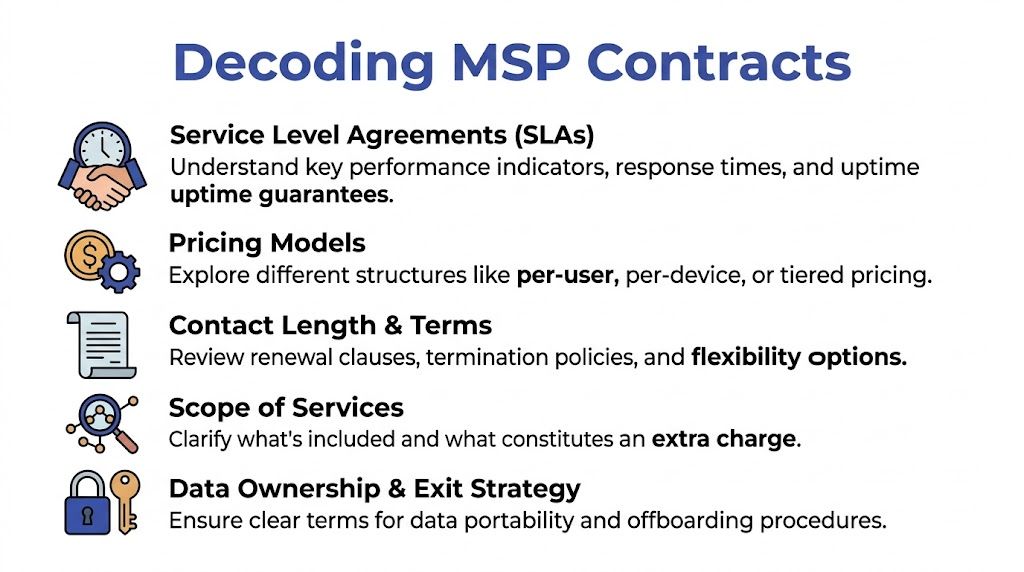
The SLA defines how the MSP behaves when something breaks. It should spell out response targets, severity levels, communication expectations, escalation paths, and uptime commitments where applicable. If the language is soft or general, the client has little recourse when service slips.
Look closely at these areas:
- Critical response definitions. What qualifies as critical, and who decides?
- Response versus resolution. Acknowledging a ticket isn’t the same as fixing the issue.
- After-hours coverage. Is true emergency response included or billed separately?
- Escalation path. Who gets involved when a problem lingers or expands?
- Reporting cadence. How does the MSP prove it met the SLA?
Contract warning: “Unlimited support” often means unlimited support within a narrow definition of covered work.
Understand the pricing model before comparing providers
MSPs package pricing in different ways. None is automatically better. The best model is the one that fits how the business operates.
| Pricing model | Best fit | Risk to watch |
|---|---|---|
| Per-user | Office-heavy teams with predictable staffing | May not cover shared devices or specialty systems |
| Per-device | Environments with many managed assets | Can penalize growth in endpoint count |
| Tiered bundles | Businesses that want service options | Lower tiers may omit key protections |
| All-inclusive | Clients wanting budgeting simplicity | Scope disputes if “included” work isn’t clear |
A manufacturer with plant devices, cameras, and mixed user types may need a very different model than a nonprofit with mostly standard office users. A school may need one structure for staff endpoints and another for shared labs or classroom technology.
Hidden fees usually live in the margins
The proposal may look tidy, but real cost overruns tend to appear in exclusions and assumptions.
Review these items line by line:
- Onboarding charges. What’s included in discovery, documentation, agent deployment, and transition work?
- Project labor. Which upgrades or migrations fall outside monthly service?
- Vendor management. Does the MSP coordinate with internet, software, and hardware vendors as part of the agreement?
- Security add-ons. Are protections like managed SOC, email security, or advanced backup included or separate?
- On-site support. Is travel or dispatch built in?
Protect the exit before signing the entry
A clean offboarding clause is one of the best signs that a provider is confident in its service.
The contract should clearly address:
- Data ownership
- Configuration and documentation handoff
- Tool removal process
- Timeline for transition cooperation
- Auto-renewal terms
- Termination rights for service failures
Businesses looking at communications and security under one roof should also confirm whether specialized systems are part of the managed scope. One option in that category is Nutmeg Technologies, which provides managed IT alongside unified communications and scalable video security services. That matters because split ownership across multiple vendors often creates finger-pointing during outages.
A good contract reduces ambiguity. A bad one hides it in polished language.
Align MSP Capabilities with Your Industry Needs
A generic MSP can keep passwords reset and laptops patched. That doesn’t mean it can support the way a specific industry works.
Many selections fail at this point. The provider may be technically competent in a broad sense, but not competent in the systems and workflows that matter most to the client.
According to Yeo & Yeo, by 2026, 65% of SMBs are projected to demand specialized services like AI-driven video analytics for security. The same source says 55% of manufacturing clients regret choosing providers without expertise in unified communications and video security.
Manufacturing needs more than office IT support
A manufacturer with multiple buildings may depend on wireless stability across shop areas, secure remote access for vendors, low-latency camera visibility, and network segmentation between business systems and operational devices.
A generic provider may treat that environment like a larger office. That’s where trouble starts. Camera performance gets ignored until an incident review. Floor connectivity becomes “good enough.” Unified communications across office, plant, and mobile staff stays fragmented.
For cloud-heavy operations layered on top of that, this guide to choosing a Managed Service Provider for AWS is useful because cloud support should be evaluated separately from basic help desk promises.
Education and child services require operational sensitivity
A school or educational nonprofit doesn’t just need someone who can fix devices. It needs a provider that understands shared devices, content filtering expectations, access controls, staff turnover cycles, and the practical reality of supporting classrooms without disruption.
Support style matters here. So does documentation. If the MSP can’t explain how it handles onboarding and offboarding for staff, account permissions, and backup accountability, it probably doesn’t understand the environment well enough.
The best industry-fit questions are narrow. Ask how the provider supports classroom devices, floor systems, plant cameras, or multi-site phone routing. Generic answers reveal generic experience.
Multi-site organizations need integrated systems
Faith-based organizations, regional nonprofits, and distributed businesses often discover that “IT support” and “communications support” have been separated for too long. One vendor handles internet. Another handles phones. Another handles conferencing. Another handles cameras.
That arrangement works until something crosses systems. Then no one owns the problem.
A better-fit MSP should be able to discuss:
- Desk and mobile phone integration
- Conference room and remote meeting support
- Messaging and presence tools
- Video security with secure remote access
- Support consistency across sites
That’s where industry familiarity becomes operationally useful. A provider with relevant vertical experience knows what the daily failure points usually are.
Organizations that want to test that fit should ask for examples tied to their own sector and operating model. Nutmeg’s industry experience page shows the kind of vertical alignment buyers should look for from any provider, whether the need is manufacturing, education, nonprofit operations, or multi-site communications.
Make the Final Call and Plan for Onboarding
By the final stage, the decision usually comes down to two providers that both appear capable. That’s when references and onboarding discipline become the tie-breakers.
Reference checks should be specific. Don’t ask whether the client is “happy.” Ask what daily service feels like.
Ask references what happens on ordinary days and bad days
Useful questions include:
- How responsive is the MSP when an issue interrupts operations?
- Does the provider solve recurring problems or just close tickets?
- How well does it communicate during incidents?
- Are invoices consistent with the original proposal?
- Has the relationship become more strategic over time?
The best reference answers include examples, not compliments.
Treat onboarding like a project, not a kickoff call
A strong onboarding process should include documented responsibilities, system discovery, access review, tool deployment, reporting setup, and communication rules for both sides. The client should know who to contact, how priorities are assigned, and what the first review period will cover.
A clean transition usually includes:
- Documentation handoff and validation
- Administrative access review
- Monitoring and security tool deployment
- Backup verification
- User communication and support instructions
- A scheduled review after the first stretch of service
A good onboarding plan reduces surprises. A rushed onboarding creates them.
The first months matter. That’s when the client learns whether the MSP can translate proposals into day-to-day execution. Strong providers bring order quickly. Weak ones start asking basic questions after the contract is signed.
The final call should go to the provider that best matches the business’s real operating needs, communicates clearly, and can support both today’s environment and tomorrow’s growth.
Businesses that want a practical conversation about managed IT, cybersecurity, unified communications, or video security can contact Nutmeg Technologies. The company works with organizations that need predictable support, clearer accountability, and infrastructure that fits the way they operate.